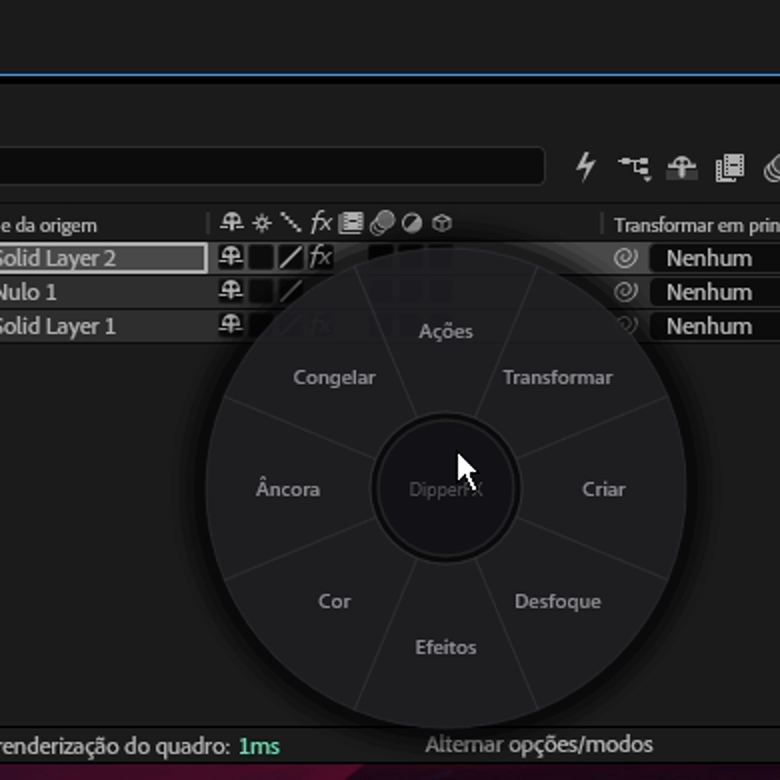
Everything you need to install, use the 3-day free trial, activate your lifetime key and turn DipperFX Elements into muscle memory.
Default shortcutCtrl + Shift + Q
01 · Getting started
Install and open it in minutes.
DipperFX Elements 1.2.0 works with After Effects 2022 or newer on Windows and macOS. The download unlocks every feature for 3 days; after that, the panel asks for a lifetime key.
Full 3-day trial, no card required
The trial is linked to the computer and does not restart when the plugin is reinstalled.
Extract the entire DipperFX Elements ZIP before running any file.
2
Close After Effects
The application must be closed so the files install correctly.
3
Run the installer
Open INSTALL_WINDOWS.bat and approve the Windows administrator prompt.
4
Open the panel
In After Effects, go to Window → Extensions (Legacy) → DipperFX Elements.
5
Connect to the internet
On first launch, the server registers the computer and automatically starts the 3 free days.
6
Confirm the fixed build
If the activation screen appears, make sure the footer shows FIX L3.
macOS installation
1
Download and extract
Extract the Mac ZIP before running any file.
2
Close After Effects
The application must remain closed during installation.
3
Open the installer
Right-click INSTALL_MAC.command and choose Open.
4
Open the panel
In After Effects, go to Window → Extensions (Legacy) → DipperFX Elements.
5
Use Open Wheel
On Mac, the interactive wheel works inside the panel and runs the same tools.
6
Confirm the fixed build
If the activation screen appears, make sure the footer shows FIX L3.
Your first wheel
01
On Windows, move the cursor over the composition. On Mac, click Open Wheel in the panel.
02
On Windows, hold right-click or press Ctrl + Shift + Q. On Mac, move the cursor inside the open wheel.
03
Slide to a category and then to a tool.
04
Release to run it. Done.
02 · Trial & activation
Three days free. Then, lifetime access.
During the trial, the panel shows the remaining time. Your purchase generates an individual DFX1-XXXX-XXXX-XXXX-XXXX key, automatically sent to the email used on Hotmart.
Full trial
Every feature is available for 72 hours from the first validation on this computer.
One key per computer
The key is linked to the first activated Windows or Mac computer and cannot be used on another machine at the same time.
Lifetime access
After activation, there is no subscription or additional charge to keep using it on that computer.
Safe reinstallation
FIX L3 preserves the license and presets and moves old CEP copies outside Adobe scan folders.
How to activate after purchase
1
Complete your payment Hotmart
Use an email address you can access.
2
Open the DipperFX Elements email
Copy the DFX1 key sent after payment confirmation.
3
Open the Activation tab
In the plugin panel, open Activation, paste the full code and click Activate lifetime access.
4
Keep the computer online
Online validation links the key to the computer. The IP is used as a security record without blocking normal network changes.
Changed computers?
The key does not migrate automatically. Contact @dipperdzn for review and a manual reset when the change is legitimate.
03 · Using the wheel
One gesture does it all.
Hold, slide and release. After a few repetitions, the motion becomes part of your workflow.
Hold
The wheel appears exactly under the cursor.
→
Slide
The category opens its tools around it.
→
Release
The tool runs immediately.
Regular right-click still works.
A quick click opens the standard After Effects menu. DipperFX Elements appears only when you hold the button for the configured delay.
Gesture control
Move back to the center to collapse the tools and choose another category.
Release over an empty area or press Esc to close without running anything.
Adjust the right-click delay in Preferences; the default is 200 ms.
Choose a small, medium or large wheel for your monitor.
04 · Tools
What is inside each block.
The default layout has eight categories placed to make common paths faster.
Actions
Split, Pre-comp, Easy Ease, Un-precomp, Trim Comp, Duplicate and other direct commands.
Transform
Center, fit to width or height, and flip horizontally or vertically.